Creating a Geometry Node
From an outdated patch to a better understanding.
Milton Montiel
Programming with nodes have always felt very natural for me. They say a Mathematician doesn't like to make choices, so I really appreciate the non-destructive nature of modeling with geometry nodes.
Ton's of very cool software offer a node-based workflow: VCV Rack, Fusion, Bitwig's Grid, Houdini, MAX for Live, the list goes on. I think it is very natural to wonder how do they work.
Lucky for all of us Blender is open source, but the geometry nodes module is not very well documented. In fact, the starting point in the documentation is this old pull request named How to add a new node?
In this post we will try to understand the pull request. My plan is to write a full series explaining bits of the architecture, but small steps. Small steps.
Building your own Blender
I wrote a post explaining my development setup for Blender, including quality of life settings and debugging options. Feel free to take a look.
Boilerplate code
A geometry node can be created by adding/modifying the four files contained in this code tree.
/* SPDX-FileCopyrightText: 2024 Blender Authors
 *
 * SPDX-License-Identifier: GPL-2.0-or-later */
#include "BKE_mesh.hh"
#include "BLI_math_vector_types.hh"
#include "node_geometry_util.hh"
namespace blender::nodes::node_geo_hello_world_cc {
static void node_declare(NodeDeclarationBuilder &b)
{
  b.add_input<decl::Geometry>("Mesh").supported_type(GeometryComponent::Type::Mesh);
  b.add_input<decl::Vector>("Offset").default_value({0, 0, 1});
  b.add_output<decl::Geometry>("Mesh").propagate_all();
}
static void node_geo_exec(GeoNodeExecParams params)
{
  /* Get inputs from sockets. */
  GeometrySet geometry_set = params.extract_input<GeometrySet>("Mesh");
  const float3 offset = params.extract_input<float3>("Offset");
  /* Process mesh if available. */
  if (Mesh *mesh = geometry_set.get_mesh_for_write()) {
    MutableSpan<float3> positions = mesh->vert_positions_for_write();
    for (const int i : positions.index_range()) {
      positions[i] += offset;
    }
    mesh->tag_positions_changed();
  }
  /* Set output socket. */
  params.set_output("Mesh", std::move(geometry_set));
}
static void node_register()
{
  static blender::bke::bNodeType ntype;
  geo_node_type_base(&ntype, "GeometryNodeHelloWorld");
  ntype.ui_name = "Hello World";
  ntype.ui_description = "My first node";
  ntype.nclass = NODE_CLASS_GEOMETRY;
  ntype.geometry_node_execute = node_geo_exec;
  ntype.declare = node_declare;
  blender::bke::node_register_type(ntype);
}

NOD_REGISTER_NODE(node_register)
}  // namespace blender::nodes::node_geo_hello_world_cc
The simplest of this bunch is CMakeLists.txt, but since there is not much to see in that file, lets start with the juicy one: node_geo_hello_world.cc.
Ingredients for a node
node_geo_hello_world.cc contains everything required to create a node. It is composed of three functions and a macro:
namespace blender::nodes::node_geo_hello_world_cc {
static void node_declare(NodeDeclarationBuilder &b) {...}

static void node_geo_exec(GeoNodeExecParams params) {...}

static void node_register() {...}

NOD_REGISTER_NODE(node_register)
}  // namespace blender::nodes::node_geo_hello_world_cc
NOD_REGISTER_NODE is a macro that allows some python script to discover this node and register it in the node tree.
/**
 * This macro has three purposes:
 * - It serves as marker in source code that `discover_nodes.py` can search for to
 *   find nodes that need to be registered. This script generates code that calls the
 *   register functions of all nodes.
 * - It creates a non-static wrapper function for the registration function that is
 *   then called by the generated code. This wrapper is necessary because the normal
 *   registration is static and can't be called from somewhere else. It could be made
 *   non-static, but then it would require a declaration to avoid warnings.
 * - It reduces the amount of "magic" with how node registration works. The script
 *   could also search for `node_register` functions directly, but then it would not
 *   be apparent in the code that anything unusual is going on.
 */
#define NOD_REGISTER_NODE(REGISTER_FUNC) \
  void REGISTER_FUNC##_discover(); \
  void REGISTER_FUNC##_discover() \
  { \
    REGISTER_FUNC(); \
  }
The rest of the functions define different parts of the node. If you were so kind to please consult the table:
| Function | Answers to |
|---|---|
node_declare | What are my input and outputs? |
node_geo_exec | How do I turn my inputs into my outputs? |
node_register | How my node looks, Mike? |
So far this is very nice. Let us explore what the API can offer us in each case.
What are my Inputs/Outputs?
Let's black-box NodeDeclarationBuilder and think of it as a fancy list that contains the connection points for our node.
Using generics we can specify the type our input/output is recieving/sending.
static void node_declare(NodeDeclarationBuilder &b)
{
  b.add_input<decl::Geometry>("Mesh")
      .supported_type(
        GeometryComponent::Type::Mesh
        );

  b.add_input<decl::Vector>("Offset")
      .default_value({0, 0, 1});

  b.add_output<decl::Geometry>("Mesh")
      .propagate_all();
}
notice that we can't use an arbitrary type
b.add_input<int>("Integer");
this throws at us something like
So what types can we use? Good that you ask! The types we can freely use are implemented in NOD_socket_declarations.hh. Here is the code for the
Int type.
class Int : public SocketDeclaration {
 public:
  static constexpr eNodeSocketDatatype static_socket_type = SOCK_INT;

  int default_value = 0;
  int soft_min_value = INT32_MIN;
  int soft_max_value = INT32_MAX;
  PropertySubType subtype = PROP_NONE;

  friend IntBuilder;

  using Builder = IntBuilder;

  bNodeSocket &build(bNodeTree &ntree, bNode &node) const override;
  bool matches(const bNodeSocket &socket) const override;
  bNodeSocket &update_or_build(bNodeTree &ntree, bNode &node, bNodeSocket &socket) const override;
  bool can_connect(const bNodeSocket &socket) const override;
};

class IntBuilder : public SocketDeclarationBuilder<Int> {
 public:
  IntBuilder &min(int value);
  IntBuilder &max(int value);
  IntBuilder &default_value(int value);
  IntBuilder &subtype(PropertySubType subtype);
};
If types are spaces, then types with a default value look a lot like pointed spaces, don't they?
These classes impose useful restrictions to the types we would want to use, so make sure you get familiar with that file.
Now observe the Transform Geometry node. Things start to make a little bit of sense right?
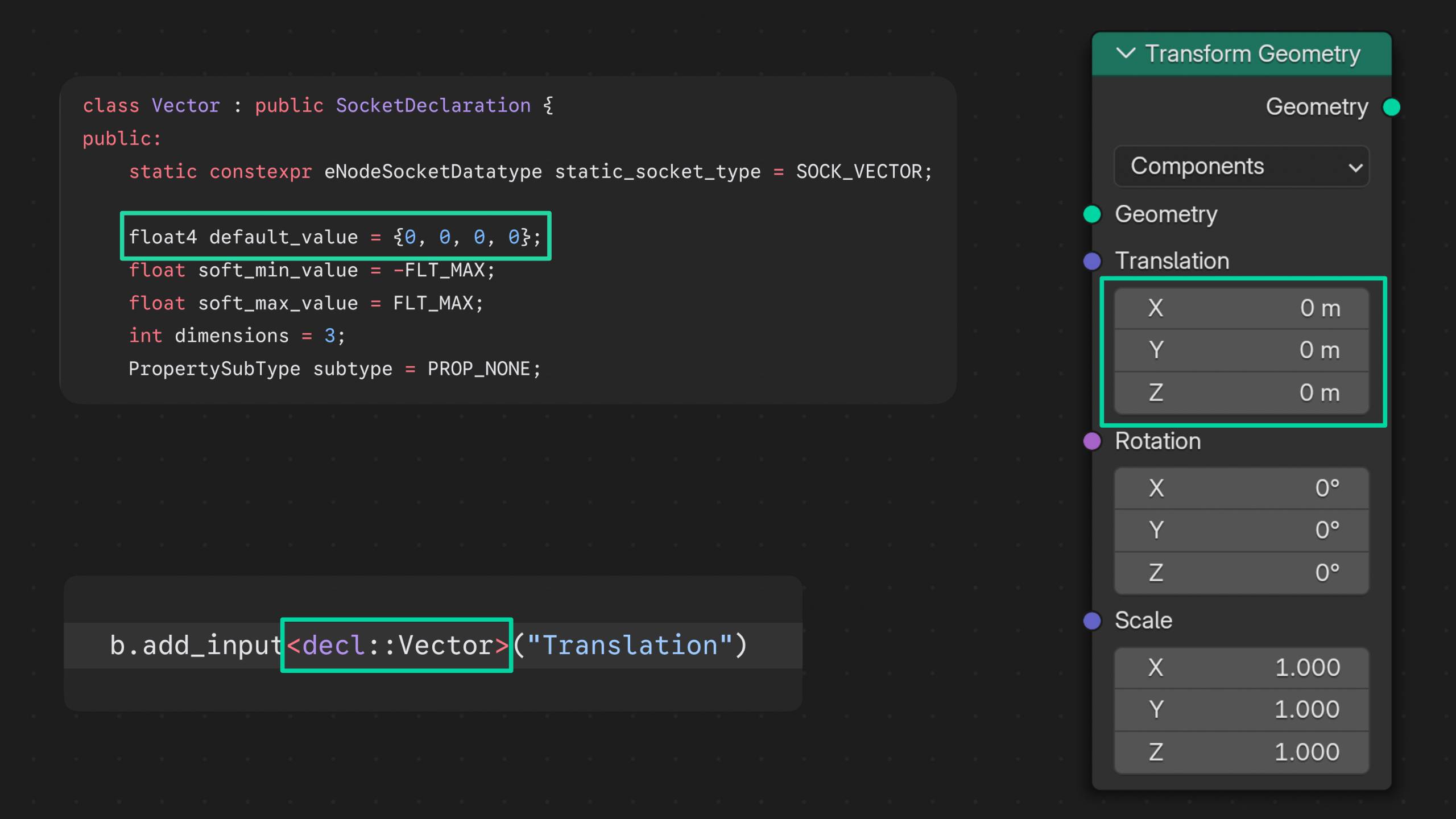
if you know about the builder pattern then you can see what .default_value(), .supported_type() and .propagate_all()
are doing to the inputs/outputs.
Now we know how to build sockets (inputs/outputs from now on) and how to list all admisible types. Lets put them to use.